
Registration of CS Plug-in
A CIRCUS CS plug-in is a Docker image, which can be exported as a tar archive (xxx_ver.1.0.0.tar). To register a plug-in, take the following steps.
Preparation#
Use the docker load command (on the host) to import the Docker image:
$ docker load -i xxx_ver.1.0.0.tarOption 1: Run the Registration Script within the Container (Recommended)#
Start CIRCUS, attach to the container's Bash, and run the following command.
# /circus/cad_plugin_registration.sh [REPOSITORY]:[TAG]You will see a confirmation message like the following. Type "Y" and Enter.
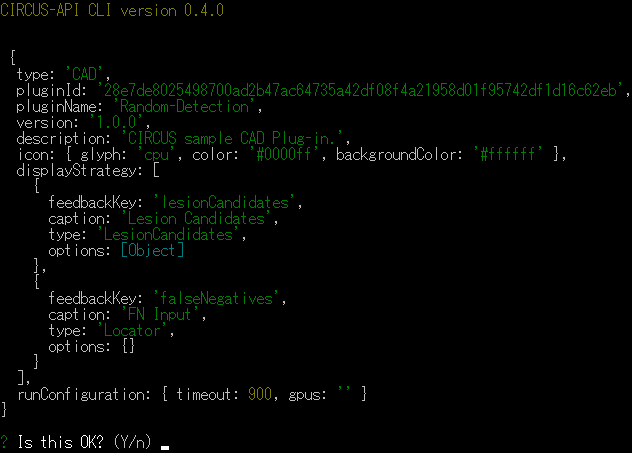
Option 2: Running CIRCUS CLI in the Container#
-
Run the following command on the host and inspect the full image ID of the plug-in.
$ docker images --no-truncThe string following "sha256:" in the Image ID column of the Docker image to be registered is the full ID required for registration (see figure below).

-
Run the following command (in the container) to register the information of the CIRCUS CS plug-in.
Inside the container# /circus/services.sh & # cd /var/circus/packages/circus-api # node circus register-cad-plugin [FULL-IMAGE-ID] -
You will see a confirmation message like the following. Type "Y" and Enter.
To Use GPU (for Linux Only, Optional)#
When the installed plug-in needs to access a GPU, you need to install CUDA Driver and nvidia-container-runtime, and configure Docker.
-
Add the repository of nvidia-container-runtime.
$ curl -s -L https://nvidia.github.io/nvidia-container-runtime/gpgkey | sudo apt-key add - $ distribution=$(. /etc/os-release;echo $ID$VERSION_ID) $ curl -s -L https://nvidia.github.io/nvidia-container-runtime/$distribution/nvidia-container-runtime.list | sudo tee /etc/apt/sources.list.d/nvidia-container-runtime.list $ sudo apt update -
Install nvidia-container-runtime and restart the host machine.
$ sudo apt install nvidia-container-runtime $ sudo reboot -
Edit
/etc/docker/daemon.jsonand add the following (sudorequired).{ "default-runtime": "nvidia", "runtimes": { "nvidia": { "path": "/usr/bin/nvidia-container-runtime", "runtimeArgs": [] } } }